
Adobe CX Coworker across AI tools: permissions first
Adobe opens CX Enterprise Coworker to multiple AI environments. Who may actually retrieve data and invoke actions once an organization enables access?

Adobe names ChatGPT, Claude, Gemini, Copilot and Databricks. User access can default to enabled in activated organizations, while application permissions still apply.
Short answer: Adobe says CX Enterprise Coworker is available through AI environments including ChatGPT, Claude, Gemini, Microsoft Copilot and Databricks Genie. But technical integration must not be confused with organizational enablement or universal end-user permission: Coworker has organization-wide access settings, optional overrides and application-specific inherited rights.
1. Why a cross-platform coworker matters
Adobe's November announcement extends customer-experience workflows into assistants already used by marketing and operations teams. The company describes analysis, forecasting, campaign orchestration and customer-journey tasks, supported by Model Context Protocol (MCP) and Agent2Agent (A2A) concepts. The material shift is not the chat interface; it is the prospect of actions in one enterprise system being initiated from another.
Adobe explicitly lists a ChatGPT plugin, Claude, Databricks Genie, Gemini for business and Microsoft Copilot among available environments. Amazon Quick, IBM and Snowflake are framed as future integrations. Treating every named platform as currently and universally enabled would overstate the release.
2. Platform support is not permission to use a service
Adobe's November 7 access-control documentation draws a vital distinction: an organization first needs Coworker enabled. Within such an organization, an organization-wide setting controls use; Adobe says access is enabled for everyone by default, with user- or group-based overrides available.
There is an additional layer. Compatible Adobe CX applications still enforce their established permissions. Adobe's example is straightforward: Coworker should not be able to access an Adobe Experience Platform dataset that the user is not entitled to see. This is an important product-design statement, not an independent outcome from our own access testing.
3. AgentenCode integration and governance matrix
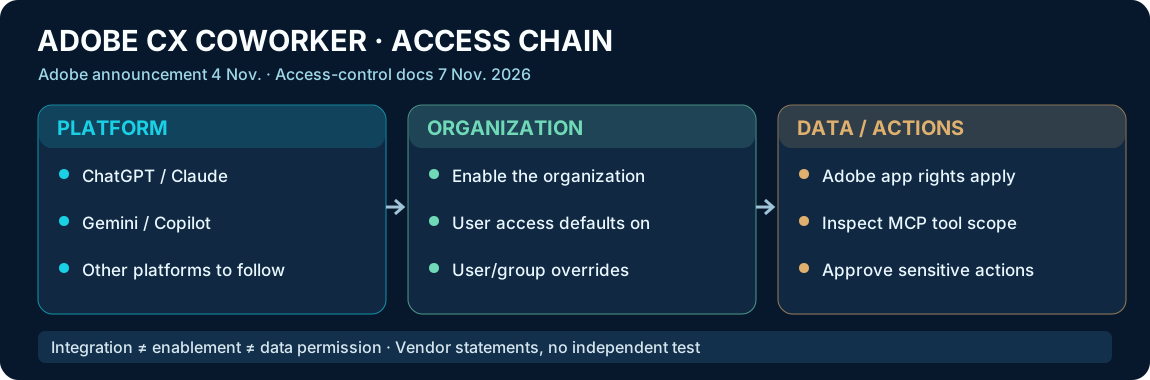
| Layer | Documented source status | What to test before deployment |
|---|---|---|
| ChatGPT, Claude, Gemini, Copilot, Databricks | Adobe-announced integrations | Actual organization and account access |
| Amazon Quick, IBM, Snowflake | Future availability stated | Do not assume current production support |
| Coworker organization setting | Organization enablement required; users enabled by default | Review initial tenant-wide scope |
| User/group access | Optional overrides | Verify exceptions and administrators |
| Compatible Adobe CX apps | Existing app permissions are respected | Denied and allowed data access, write boundaries |
| Partner MCP connectors | Prebuilt options announced | Tool actions, identity, revocation and audits |
Original AgentenCode analysis. This is an operational checklist, not a security certificate.
4. The action chain is the real security boundary
Consider a marketer asking an external assistant for an audience plan. The apparent single interaction may involve an employee identity, an external AI frontend, the Adobe coworker and one or more data or marketing platforms. Every hop may have its own access boundary and approval state.
Adobe says Coworker honors compatible applications' permissions. Enterprises should verify that by setting up both allowed and explicitly disallowed data retrievals, then separately testing a consequential write or campaign action with a human approval requirement. A successful answer from the interface does not establish that each downstream operation is correctly scoped.
5. MCP solves connectivity, not the whole governance problem
Adobe highlights prebuilt connectors for systems including Amazon Ads, Meta campaign tooling, Demandbase, Databricks and Microsoft Work IQ. The existence of a connector alone does not define who may invoke its methods, what personal data crosses the boundary or who can revoke authority after a project changes hands.
For each connector, our recommended inventory records data read scope, permitted write actions, associated user or service principal, regional requirements, logging and rollback behavior. This is a prudent validation plan rather than a claim of a discovered Adobe weakness or an independently tested connector defect.
6. A safer rollout order
First enable Coworker only for a small pilot where feasible, review the default organization-wide settings and document who administers them. Next, assign the minimum Adobe application rights required for a nonproduction campaign-analysis task. Then test an external AI entry point. Finally, add a partner connector only after its action and data scopes are mapped.
Adobe says Coworker user groups are currently distinct from Adobe Admin Console groups; group synchronization is on the roadmap. That seemingly administrative detail can matter more than a new platform logo when enterprises need to control real user access.
7. Editorial assessment and FAQ
AgentenCode assessment: Cross-platform access may reduce the friction of using customer-experience tools. Its value in a real enterprise will depend on provable limits for data retrieval, execution and approval, not merely a list of integrations. Organizations should distinguish functionality announced by Adobe from functionality enabled in their own environment.
Does Coworker automatically turn on for every company? No. Adobe requires the organization to be enabled. Within an enabled organization, user access defaults to enabled unless changed.
Does every user receive unrestricted CX data access? Adobe says no: compatible applications retain their existing permission controls.
Are AWS, IBM and Snowflake included in the current availability claim? Adobe describes those integrations as expected to follow.
Primary sources and limitations
- Adobe corporate announcement, 4 November 2026: https://news.adobe.com/news/2026/11/adobe-integrates-agentic-cx-enterprise-coworker-into-ai-platforms
- Adobe Experience League access control, updated 7 November 2026: https://experienceleague.adobe.com/en/docs/coworker/content/administration/access-control
- Adobe documentation updates, 4 November 2026: https://experienceleague.adobe.com/en/docs/coworker/content/more-resources/documentation-updates
- AgentenCode EN dossier: https://agentencode.de/en/agents/adobe-cx-enterprise-coworker/
Source-backed editorial review, independently prepared access-governance matrix and explicit rollout distinctions. No hands-on enterprise deployment, penetration test, customer ROI benchmark, or verified universal regional availability.
Original sources and limitations
- https://news.adobe.com/news/2026/11/adobe-integrates-agentic-cx-enterprise-coworker-into-ai-platforms
- https://experienceleague.adobe.com/en/docs/coworker/content/administration/access-control
Vendor sources and original analysis; no independent hands-on/security/ROI verification.