
GitHub Copilot enters JetBrains Air: ACP unifies the workflow, not the spending controls
Copilot now runs as a selectable Air agent, locally or in cloud tasks. Cloud sandboxes are ephemeral, but JetBrains Air cannot account for or cap Copilot usage.
On November 3, 2026, GitHub and Microsoft announced that GitHub Copilot is available inside JetBrains Air as a selectable coding agent. Air's agent picker can launch Copilot, follow multiple parallel sessions and review results in the project context. The integration uses the Agent Client Protocol (ACP).
Sources and limitations
- Primary source
https://github.blog/changelog/2026-11-03-github-copilot-is-now-available-in-jetbrains-air/
- Editorial context, not a product test
First-party sources dated November 3, 2026. Decision framework is AgentenCode editorial analysis; no independent hardware, agent-runtime or security test.
Key takeaway: one agent interface, two control planes
On November 3, 2026, GitHub and Microsoft announced that GitHub Copilot is available inside JetBrains Air as a selectable coding agent. Air's agent picker can launch Copilot, follow multiple parallel sessions and review results in the project context. The integration uses the Agent Client Protocol (ACP).
This is more than the existing Copilot chat plugin. But it is not an automatic upgrade to free, universal cloud execution: Air Teams cloud tasks require a supported JetBrains organization, administrative permission and an eligible Copilot subscription.
What ACP adds—and what it does not
ACP links the agent with the Air working environment. Developers can ask Copilot to perform coding tasks and inspect the work in Air alongside other agent sessions. The standard creates a more portable interaction surface, while the established GitHub Copilot plugin remains an option.
Interoperable agent messaging does not mean identical tool permissions, data handling, model availability or billing across vendors. The effective security boundary still depends on the chosen execution environment and organization policy.
Local sessions versus managed cloud tasks
For a local task, users install Air in a JetBrains IDE, pick GitHub Copilot and connect their existing account. For an Air Teams cloud task, they also need an eligible business organization, Copilot enabled by an Air administrator, and the necessary GitHub authorization.
GitHub says a Copilot cloud task runs in a Docker container on a fresh virtual machine, routes traffic through a proxy, and does not retain state between tasks. It can build and test software without modifying the developer's local environment. Those are vendor-documented operating conditions, not an independent guarantee that every possible action or network path is harmless.
The governance gap is in the footnotes
GitHub's November 3 documentation makes a noteworthy distinction: Air's governance and analytics do not include Copilot consumption, and an Air administrator can disable Copilot but cannot set Copilot spending limits inside Air. Copilot tasks consume the GitHub Copilot plan, not JetBrains AI credits.
There is also a plan-selection constraint: individual tasks cannot choose whether to charge a personal or organizational Copilot plan. Consequently, assigning an Air AI-credit limit does not prove that total Copilot usage is controlled.
AgentenCode decision matrix: five deployment boundaries
| Area | Local Air task | Air Teams cloud task |
|---|---|---|
| Eligibility | IDE, Air and Copilot sign-in | Team-enabled organization, admin enablement, Copilot entitlement |
| Execution | Local developer environment | Fresh VM, Docker and proxy per task |
| Parallel work | Multiple visible agent sessions | Local UI plus delegated cloud sessions |
| Metering | Copilot plan conditions apply | Copilot plan, not Air AI credits |
| Admin limit | Check local tools and repository rights | Air can disable agent, cannot cap Copilot spend in Air |
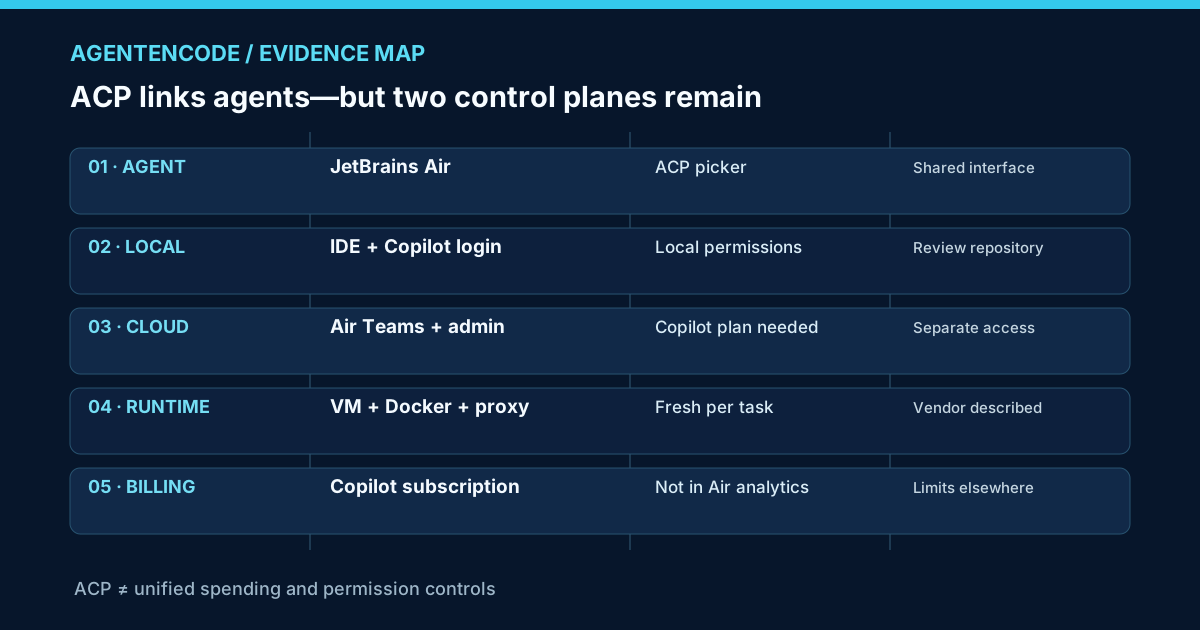
AgentenCode analysis: The interface consolidates coding sessions, but the operating model still has two control planes. JetBrains governs what Air exposes and what cloud tasks may run; GitHub governs Copilot subscription and consumption. Unifying the UI does not unify accounting.
A safe proof-of-concept for engineering teams
A practical pilot uses three test actors: a local developer, an Air Teams cloud-task user and an administrator who can inspect both JetBrains and GitHub settings. Define one reversible repository task, a strict read/write policy and a maximum expected budget.
Check which plan is actually charged, where task logs are visible, whether the administrator can stop additional tasks, and whether temporary environments contain any unintended persistent secrets. A login is not sufficient validation: GitHub cautions that cloud credit and subscription checks may occur only when the environment starts, causing a task to fail despite an apparently successful account connection.
Verdict: a real step toward agent interoperability
GitHub Copilot inside JetBrains Air makes agent choice and parallel review more coherent for developers. The overlooked issue is operational: cost visibility and authorization remain split, especially in cloud execution. Teams should evaluate ACP convenience separately from license accounting and control enforcement.
Frequently asked questions
Do I need a new Copilot subscription? GitHub describes use of an existing eligible subscription. Specific quotas and entitlements depend on the plan.
Is the cloud agent identical to a local one? The interface can be similar, but execution environment, administrator prerequisites and risk boundaries are distinct.
Can an Air administrator cap Copilot charges? Not within Air, according to GitHub's launch notes. Billing controls need to be verified on the Copilot side.
Sources and editorial method
- GitHub Changelog, November 3, 2026 — first-party access, ACP, sandbox and spending details.
- Microsoft Java DevBlog, November 3, 2026 — rollout and integration background.
- JetBrains Air Teams: setup and governance — organizational policy context.
Method: Source comparison and original permission/metering matrix. No independently executed Copilot or Air cloud session, verified billing invoice or third-party penetration test. Cover is symbolic editorial artwork, not an authentic vendor screenshot. Further reading: Choosing an AI agent, Previous JetBrains Copilot update, AgentenCheck.