
Gemini now edits PDFs, spreadsheets and slides in chat—but what really works?
On October 29, 2026, Google introduced direct file previewing and editing inside the Gemini app. Users can create and revise PDFs, documents, spreadsheets, slide decks and code without leaving their conversation. That removes an inconvenient handoff—but a file that can be edited is not necessarily correct, approved or ready to share.
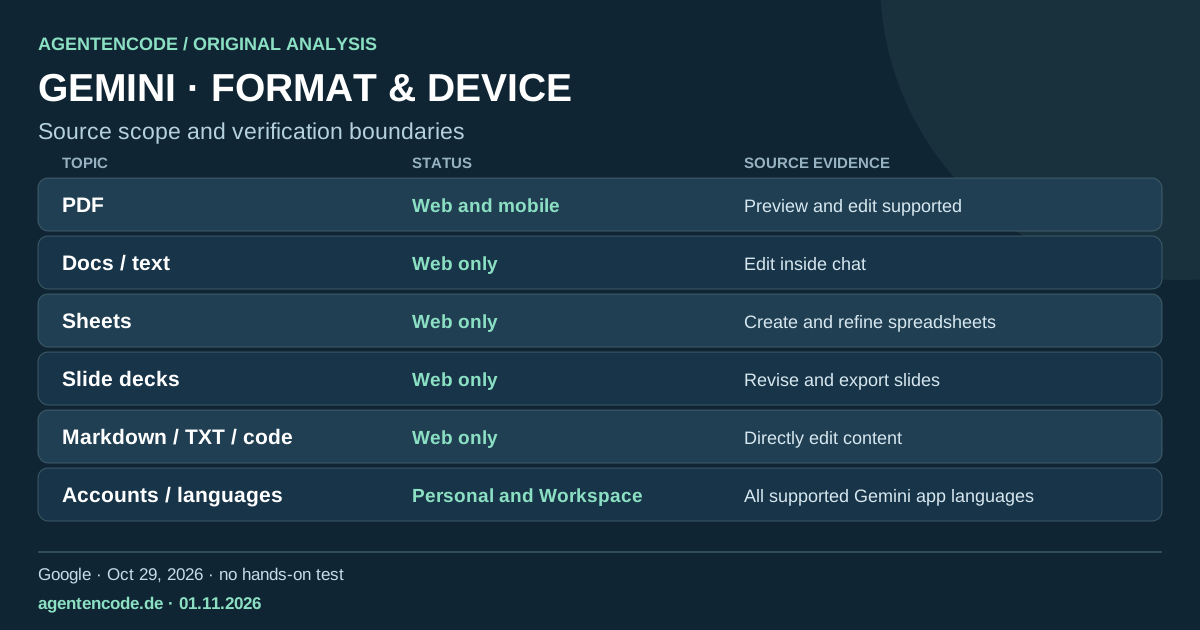
Google adds in-chat file editing to Gemini: PDFs on mobile and web, documents, spreadsheets and slides on web. Our original decision matrix.
Sources and limitations
- Primary sources
Official announcement dated 2026-10-29. Original source.
- Status and test limits
PDF on web and mobile; other file types currently web-only. No independent product tests.
What changed, and what was already possible
Google had already announced file generation in April 2026. The new aspect of its October 29 announcement is inline previewing and editing: people can expand a document into a full-screen view, change text themselves or highlight a passage for Gemini to refine. Google explicitly distinguishes platforms. PDF previewing and editing work on web and mobile; Docs, Sheets, slide decks, Markdown, TXT and code are currently web-only. That device split matters much more than a broad promise that Gemini can now edit every kind of file everywhere.
AgentenCode's original format and verification matrix
The matrix below pairs each capability described by Google with a separate human verification checkpoint. Its last column is our editorial recommendation, not a vendor guarantee. Good-looking spreadsheets may contain incorrect formulas; polished presentations may repeat unsupported claims; and a PDF that looks fine in chat may be wrong after export. This is why editing support and trustworthy output should be evaluated separately.
| Topic | Status | Evidence | Recommendation |
|---|---|---|---|
| Web and mobile | Preview and edit supported | Verify export, layout and references | |
| Docs / text | Web only | Edit inside chat | Check citations and formatting |
| Sheets | Web only | Create and refine spreadsheets | Recalculate formulas and totals |
| Slide decks | Web only | Revise and export slides | Review design and factual claims |
| Markdown / TXT / code | Web only | Directly edit content | Test code independently |
| Accounts / languages | Personal and Workspace | All supported Gemini app languages | Check plan and admin rules |
| External actions | Not promised | Editing is not publishing | Approve sharing separately |
A practical four-stage review process
Start with a non-sensitive sample and a narrowly defined request. Highlight specific sections and ask for targeted corrections rather than rewriting everything. Next, open the exported file in the application where it will actually be used and inspect calculations, references, formatting and differences from the original. Only then approve the final sharing or publication step. This is AgentenCode's recommended process, not a real-world product test that we performed. Generated code should be tested in an isolated environment.
Availability and data questions
Google's Workspace update lists personal Google accounts, Workspace Individual and Workspace customers. It says there is no separate admin control for this particular feature, while offering broader controls over access to the Gemini app. That does not establish unrestricted quotas or identical capabilities for every organization. Neither announcement establishes a new data-retention guarantee or permission to upload confidential customer records; organizations still need to apply their own policies.
The connection to AI agents
Editing a document inside a conversation moves assistants beyond plain-text drafting, but does not establish autonomous authority to send a message, publish a document or operate external services. Capability and permission remain separate. Our analysis of Gemini Computer Use covers that different class of tool-driven browser action. A responsible workflow should preserve review and approval steps around both.
Three practical next steps
- Pilot: Try a small, non-sensitive PDF or table and request one limited change.
- Verify: Inspect the exported file, formulas, citations and layout outside Gemini.
- Approve: Apply normal data-classification and sharing permissions before use.
There is no independent evidence here that the editor reduces errors or guarantees productivity gains. High-stakes content still needs qualified review.
Primary sources
Frequently asked questions
Does PDF editing work on mobile?
Google says yes for PDF previewing and editing. Other listed formats are currently web-only.
Is it only for paid accounts?
Google includes personal accounts and Workspace users; specific product limits may still differ.
Did AgentenCode independently test the editor?
No. This is a source-first analysis with an original decision matrix, not a product benchmark.