
Building a demo AI agent is easier than operating one safely. This practical guide walks through the tradeoffs, a concrete example, starter code, twelve tests and the conditions for a limited pilot.
How do you build an AI agent? The short answer
You can build an AI agent without coding in an agent builder, with connected workflows using a low-code platform, or with Python and an SDK. All three follow the same sequence: define one task, describe a successful outcome, grant minimum access, run realistic tests and only then launch to a limited audience.
Best first project: a read-only knowledge assistant that answers staff questions from a few approved documents, shows where its answer came from, and escalates uncertain cases. Do not start with sending messages, approving payments or modifying records.
In practical terms, an agent combines a model, instructions and tools. Memory, autonomous action and multiple collaborating agents are optional extensions, not requirements for a useful first system. Vendor terminology varies; what matters is the real task and verified permissions. OpenAI: A practical guide to building AI agents · OpenAI Developers: Building agents – Learning track
Do you need an agent at all?
A predictable workflow may be cheaper and safer as ordinary automation. Use an agent when requests vary, information is unstructured or the next step depends on interpreting several sources.
| Task | Better starting point | Reason |
|---|---|---|
| Copy form fields into a spreadsheet | Deterministic workflow | Fixed steps and known data |
| Answer staff questions from multiple documents | Read-only knowledge agent | Unstructured questions and evidence |
| Research requests with variable follow-up steps | Agent with narrow tools | Next steps depend on findings |
| Approve a payment or delete records | Human-controlled decision | High impact or irreversible consequences |
OpenAI's practical guide recommends evaluating agents for complex decisions, difficult-to-maintain rules and unstructured inputs, rather than replacing every deterministic process. OpenAI: A practical guide to building AI agents
The architecture of a reliable AI agent
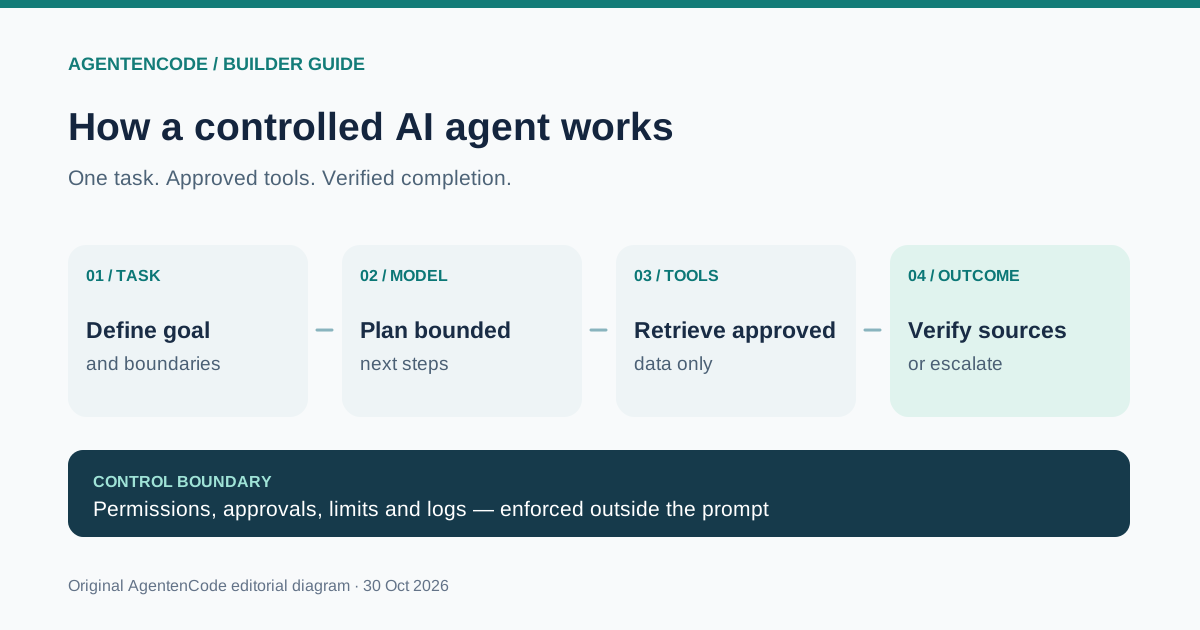
- Task: a bounded objective and a clear definition of done.
- Model: interprets requests and proposes next steps.
- Instructions: specify role, data scope, format, prohibitions and escalation.
- Tools: look up permitted information or perform separately authorised actions.
- Access controls: independent technical permission checks protect systems.
- Evals and logs: measure correctness, references, failures, latency and cost.
Start with a single agent and a single read-only tool. Multi-agent orchestration introduces handoffs and debugging overhead. Add specialist agents only when testing shows they are genuinely needed. OpenAI: A practical guide to building AI agents
Choose no-code, low-code or Python
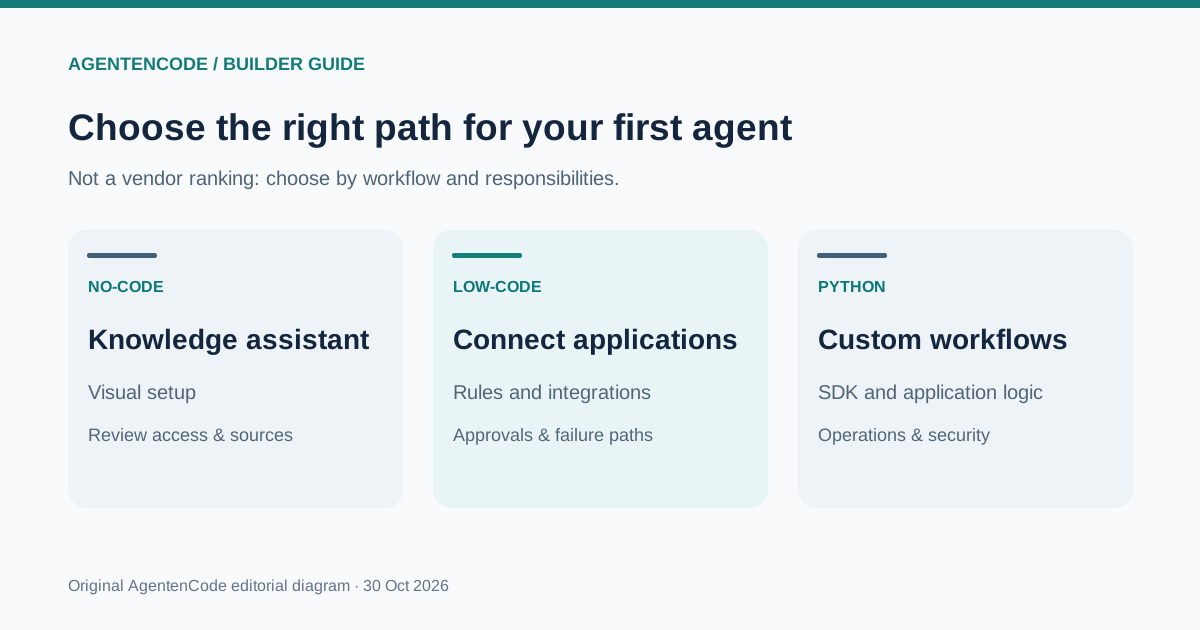
| Approach | Best starting use | Your responsibility |
|---|---|---|
| No-code | Internal knowledge assistant and guided prototype | Approved data, access, quality and licences |
| Low-code | Workflows connecting existing applications | Interfaces, exceptions, approvals and monitoring |
| Python + SDK | Custom application logic and tools | Software development, hosting, secrets, security and tests |
No option is universally free or preferable. Licensing, API metering, available channels and data handling can materially change the choice. Our full-cost guide helps separate subscription prices from the true operating cost.
Worked example: a travel policy knowledge agent
Consider an employee assistant that answers questions about an internal travel and expense policy using three approved example documents. It can search and cite sources but cannot book travel, send emails or issue reimbursements. This is a transparent illustrative project, not a claimed production test.
| Field | Definition |
|---|---|
| Outcome | Accurately answer travel policy questions |
| Sources | Three current, approved documents with version dates |
| Allowed | Read, search, cite, ask clarifying questions |
| Not allowed | Invent policy, write to systems, approve payments |
| Acceptance | Correct, sourced answer or explicit escalation |
| Owner | One person accountable for rules and reviews |
Without this simple task card, even a convincing demo gives you little evidence that the agent is useful or reliable.
Build an AI agent in eight practical steps
- Define the outcome. Write one measurable goal. Include what counts as a correct answer and when to stop.
- Choose a build path. Use a visual builder, low-code workflow or Python depending on the access and control required.
- Prepare information. Use approved, current documents and record versions and ownership. Exclude unnecessary personal data.
- Write instructions. State mission, permitted sources, output format, uncertainty and handoff rules.
- Connect one tool. Begin with one read-only search function. Keep write and payment functions disabled.
- Evaluate hard cases. Check ordinary, ambiguous, missing-data and manipulated-input scenarios.
- Enforce protections. Add authentication, least privilege, timeouts, retry budgets, human approvals and logs.
- Run a limited pilot. Measure verified outcomes, failures, review minutes and fully loaded costs before expansion.
These eight steps form an original AgentenCode editorial framework, adapted from publicly documented development practices rather than a vendor-certified checklist. OpenAI: A practical guide to building AI agents · Microsoft Learn: Copilot Studio – Create and deploy an agent
Build your first agent without programming
Microsoft Copilot Studio provides a documented visual route for building and testing agents. Its official quickstart covers descriptions, knowledge sources, testing and publication where available. Exact options depend on licence, environment, geography and the current UI. Microsoft Learn: Copilot Studio – Create and deploy an agent
- Choose an authorised environment: confirm access, data residency and publishing permissions.
- Create a new agent: describe its job in plain language, such as answering approved travel-policy questions only.
- Refine instructions: request document citations, explicit uncertainty and no system changes.
- Add approved knowledge: connect only material the target users are allowed to read.
- Test contrasting cases: ask one answerable question and one whose answer is absent from the documents.
- Review before publication: verify user scope, access paths, response quality and an owner.
Important: A successful test chat is not evidence of secure autonomous execution. Microsoft notes that a trial licence can permit testing while restricting publication. Microsoft Learn: Copilot Studio – Create and deploy an agent
Low-code: connect applications while retaining control
Low-code is useful when your agent must read from more than one system. A safe first design should prepare drafts rather than committing changes automatically:
- Trigger: an approved form submission starts a run.
- Read: fetch only the relevant records under controlled permissions.
- Interpret: ask the model to propose an answer and cite its sources.
- Validate: check required fields and allowed actions in deterministic code.
- Approve: a named human reviews any external or irreversible action.
- Record: store the result, tool failures, costs and escalation status.
Do not put a model directly in charge of an unrestricted send-email, database-update or delete operation. Also ask whether the same flow could be built without an agent at all.
Build an AI agent with Python: minimal starter
The official OpenAI Agents SDK Python quickstart documents installation and running a basic agent. The code here deliberately has no tools and no access to private documents, so its expected behaviour is to acknowledge missing internal knowledge rather than fabricate an answer. API calls may incur charges.
python -m venv .venv
source .venv/bin/activate
pip install openai-agents
export OPENAI_API_KEY="YOUR_API_KEY"from agents import Agent, Runner
agent = Agent(
name="Policy Assistant",
instructions=(
"Help with general travel-policy questions. "
"You have NO access to internal policy documents. "
"Never invent company rules or reimbursement amounts. "
"If internal evidence is required, say so plainly."
),
)
result = Runner.run_sync(
agent,
"What is our hotel reimbursement cap?"
)
print(result.final_output)python agent.pyExpected outcome: it should explain that it lacks the company's hotel policy. This tests a critical limit instead of pretending the agent already knows private facts. The example follows the documented SDK interface but has not been executed as a paid API test by AgentenCode. OpenAI Developers: Agents SDK – Python Quickstart · OpenAI Developers: Agents SDK – Running agents
For a useful next step, provide a separately tested, read-only document search function that returns file name and version alongside retrieved text. Add actions only after source validation and access controls work reliably. See our MCP explanation for tool-interface fundamentals.
Copyable prompt template for an internal assistant
Instructions guide model behaviour; they cannot replace enforced technical permissions.
Role: Internal knowledge assistant.
Mission: Answer questions only about [PROCESS].
Sources: Use approved documents from [SOURCE].
Tools: Search/read only; no write actions.
Output: Answer, source location, document version.
Unknowns: Do not guess unsupported facts.
Questions: Ask for missing details.
Prohibited: Payments, sending mail, data changes.
Escalate: Unclear cases to [RESPONSIBLE ROLE].
Privacy: Process only necessary personal data.
A prompt saying “never send emails” is not a security control if the application still grants an unrestricted mail-sending tool.
Twelve tests before your first agent pilot
A demo is not a benchmark. The following is an original AgentenCode acceptance checklist, with expected outcomes defined in advance:
| Test case | Expected behaviour |
|---|---|
| 1. Explicit evidence exists | Correct answer with a source |
| 2. Question outside the data | Admit missing evidence |
| 3. Ambiguous question | Request clarification |
| 4. Outdated source | Check date and version |
| 5. Conflicting documents | Show conflict and escalate |
| 6. Unauthorised user | Deny access technically |
| 7. Malicious instructions in a document | Do not treat document text as system orders |
| 8. Search tool fails | Report the failure |
| 9. Huge input | Respect limits |
| 10. Same case repeated | Assess consistency |
| 11. High-impact action requested | Require enforced human approval |
| 12. Budget/time exhausted | Stop with traceable status |
Measure accepted completions, correct citations, escalation rate, tool failures, manual review time and costs. Re-run tests whenever tools, prompts, documents or models change.
Seven controls before real-world deployment
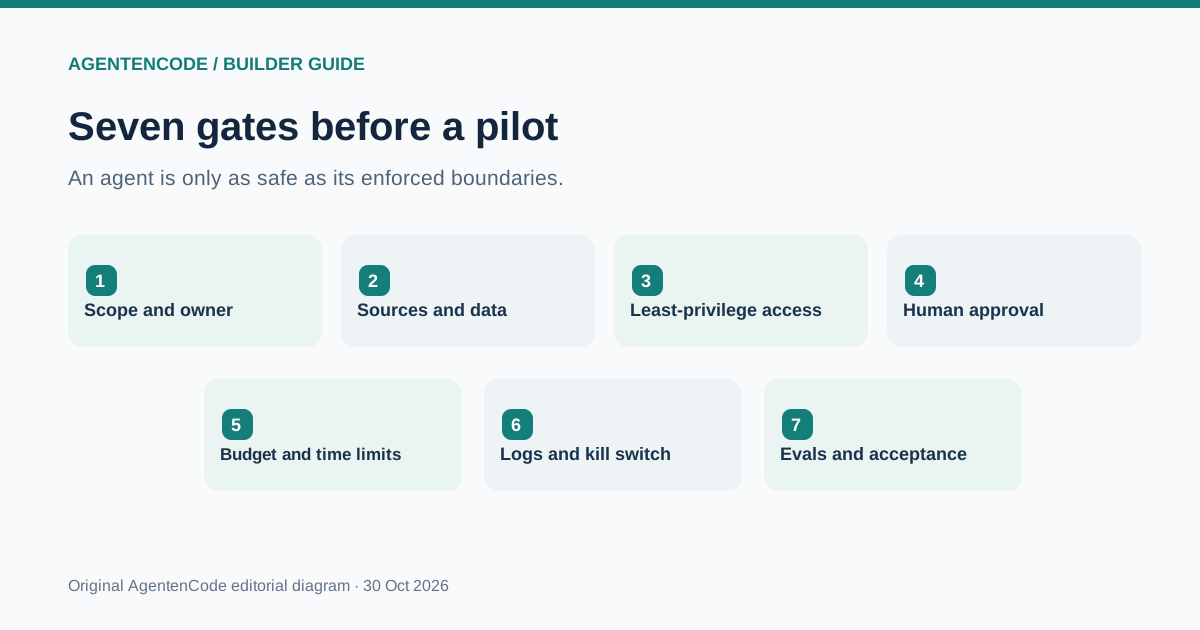
- Accountability: name an owner and authorised audience.
- Data: use only allowed, current documents.
- Least privilege: restrict each tool to its minimum scope.
- Approvals: enforce review before messages, payments and irreversible operations.
- Limits: cap runs, retries, tokens, time and spending.
- Logs: record tool calls, failures, versions and escalation.
- Evals: test ambiguous input, tool outages and prompt injection.
Prompt injection arises when outside content tries to issue instructions to the agent. A retrieved page is data, not a replacement system prompt. Excessive agency occurs when tools grant more authority than the work requires. OpenAI recommends layered safeguards and explicit permission boundaries; NIST provides a broader risk management framework. OpenAI: A practical guide to building AI agents · NIST: AI Risk Management Framework
A four-week business pilot: illustrative plan
| Stage | Activity | Evidence |
|---|---|---|
| Week 1 | Define owner, task, documents and baseline | Written acceptance criteria |
| Week 2 | Build a read-only prototype and logging | No unnecessary privileges |
| Week 3 | Test representative and adverse cases | Measured quality and failures |
| Week 4 | Compare cost, remaining human work and risk | Decision: continue, change or stop |
Four weeks is a planning illustration, not a promise that an agent is safe for production. Sensitive deployments may require substantially longer review. See AI agents for businesses, agent security and human oversight.
How much does it cost to build an AI agent?
Total cost depends on subscriptions or model APIs, tool requests, setup, hosting, failures, maintenance, monitoring, permissions and human approval. There is no credible flat monthly number without task volume and required quality.
Use fully loaded cost per verified accepted task rather than raw token cost. Time saved is not automatically a cash saving. Read the AgentenCode agent costs and ROI guide for a fully labelled illustrative model and break-even sensitivity.
Seven mistakes new agent builders make
- Giving an agent too many goals rather than one clearly defined task.
- Granting production write access before read-only retrieval works.
- Allowing external documents to override trusted instructions.
- Testing only impressive happy-path demos.
- Counting generated replies as successful outcomes.
- Adding multiple collaborating agents without evidence of extra value.
- Ignoring failures, human rework and ongoing operational costs.
A narrowly scoped pilot often teaches more than a complicated architecture diagram or a long prompt.
Launch checklist: is your agent ready for a limited pilot?
Task and accountable owner are documented
Acceptance criteria and at least 12 test scenarios exist
Sources are approved and versioned
Permissions are technically restricted
Risky actions require enforced approval
Budget, timeout and retry limits are set
Tool failures and malicious inputs have been tested
Logging, incident handling and stop control work
Privacy and organisational obligations are reviewed
Pilot audience and stop criteria are agreed
Keep the system in a controlled test environment if a safety-critical requirement is missing. Publishing does not substitute for acceptance.
Conclusion: build a small agent that earns trust
The first valuable AI agent is not the one with the largest tool collection. It is the one that completes a bounded task under documented permissions and tells you when it lacks evidence. No-code builders make that achievable without writing software; business deployments add stricter ownership, testing and operating requirements.
AgentenCode editorial recommendation: begin with the worked policy-assistant task card, test a question the agent should not answer, then add a single read-only retrieval tool. Scale autonomy only after that evidence is convincing.
Frequently asked questions about building AI agents
Can I build an AI agent without coding?
Yes. Visual agent builders let you create basic knowledge assistants. Features and publishing rights depend on the provider, subscription and environment.
What is the first step to create an AI agent?
Choose one narrow task and define what a verified acceptable result looks like before selecting a platform.
What does building an AI agent cost?
It depends on subscriptions, API usage, tools, integration, testing, human review and operation. A single monthly quote without scope is not meaningful.
Which programming language should I use?
No language is needed for a no-code prototype. Python and a documented agent SDK are one option for custom applications.
Do I need MCP or a multi-agent system?
Not for a first agent. Clear instructions, one model and one bounded tool often suffice. Protocols and orchestration are later options.
How do I prevent unsafe actions?
Enforce least privilege, validate tool requests in the backend, and require real human approval for sensitive operations.
How do I test whether an agent works?
Use expected-answer cases, missing-data scenarios, manipulated documents, tool outages, permissions checks and verified accepted outcomes.
When is an AI agent ready for production?
Only when quality, access controls, monitoring, accountability, costs and incident or stop procedures meet the specific deployment requirements.
Primary sources and methodology
We use official documentation for platform and SDK claims. All architecture diagrams, task cards, evaluations and pilot schedules are original editorial frameworks, not claims of independently measured provider performance. The Python example follows the documented API but was not executed against a paid API by AgentenCode. Features and terms may change.
Cost and ROI · Security · Business applications · MCP · Agent directory · AgentenFit