
GitHub Agentic Workflows goes GA: AI agents automate CI, issues and tests
GitHub has made reasoning-based developer automations generally available inside GitHub Actions. Their significance lies less in autonomous code generation than in separating agent reasoning, approval gates and privileged writes.
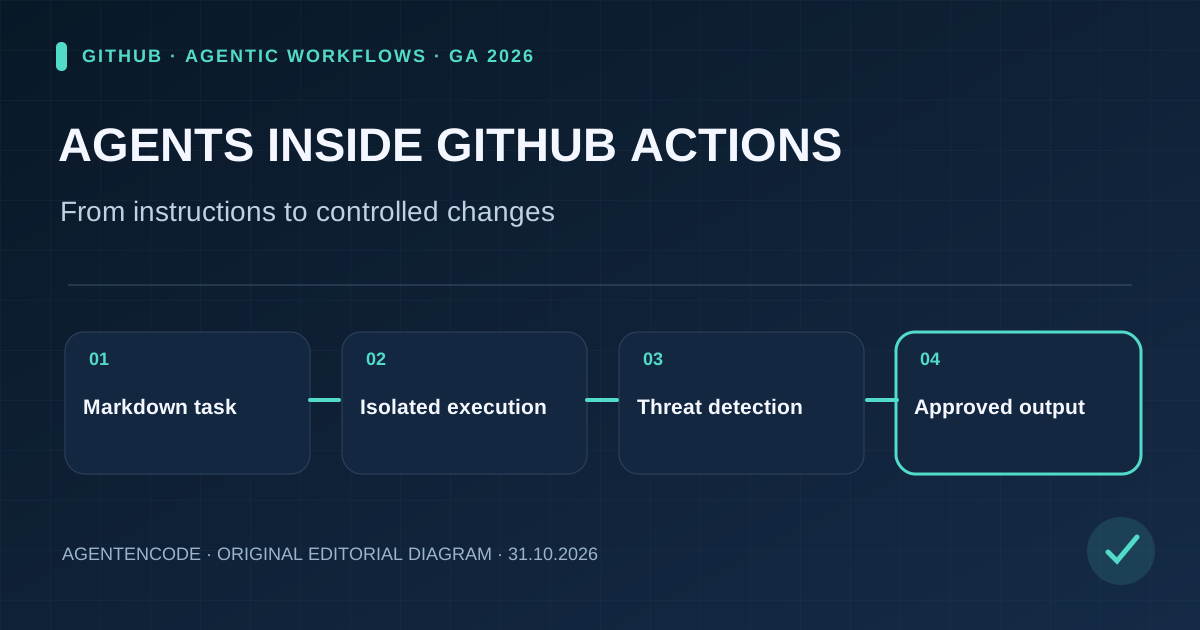
GitHub Agentic Workflows is generally available for automated reasoning tasks in GitHub Actions. Markdown compilation, read-only agent jobs, firewalls and safe outputs help constrain execution, but their effectiveness is not independently certified.
Sources and evidentiary limits
- Primary source
Dated first-party announcements and technical documentation substantiate the described features and system design. Read primary source ↗
- Not independently measured
Customer testimonials, incident replays, vendor safety claims and independent testing are clearly distinguished. AgentenCode performed no new product benchmark.
What GitHub actually released on October 28
GitHub announced the general availability of GitHub Agentic Workflows on October 28, 2026. Originating at GitHub Next, the open-source project brings coding agents into repeatable GitHub Actions jobs for work that requires interpretation rather than a fixed script: triaging incoming issues, explaining failing CI runs, drafting documentation changes, or preparing tests.
This is neither simply the Copilot chat interface nor the separate Copilot Automations product. Agentic Workflows is an approach for expressing bounded tasks, compiling them into Actions and reviewing their outputs. Its usefulness depends on what data the agent can see, what actions it can request and what the platform permits it to write. The official GitHub announcement describes availability and features, not an independently verified universal success rate.
From Markdown instructions to standard Actions YAML
Workflow authors write the job description and constraints in Markdown. The gh-aw compiler turns that description into standard GitHub Actions YAML. GitHub Actions remains responsible for triggers, runner selection, logs, organization policies and execution. A coding-agent engine supplies the reasoning needed to interpret source files, issue reports and logs during the run.
This is a useful separation of concerns: task intent stays readable, while the execution wrapper can be reviewed and constrained like familiar CI configuration. It is not automatically safe because a file uses Markdown, however. A vague instruction can lead to inappropriate suggestions, and tool permissions or runner settings can change the actual scope. Teams should review both the declarative request and the generated workflow before deployment.
Four practical use cases, with different risk profiles
Issue triage can classify incoming bug reports, request reproduction details and identify possible duplicates. Automatically closing reports is a separate, higher-risk action. CI failure analysis can inspect logs and propose hypotheses; rerunning a failing test and attaching a reproducible result creates stronger evidence than an explanation alone.
Documentation maintenance can spot stale examples after API changes and draft updates with links to the originating commit. Test generation can propose coverage for confirmed regressions, but those tests still need to execute successfully and receive technical review. The best early workflows are narrow, reversible and measurable, not systems that deploy or delete production resources on an unreviewed interpretation of outside text.
Read-only agents, network boundaries and safe outputs
GitHub documents layered controls. Agent jobs run read-only by default and in a sandbox. The Agent Workflow Firewall can restrict outbound connections. When authors declare safe outputs, the agent requests a structured action and separate, more narrowly permissioned jobs perform the allowed write—such as adding a comment, creating an issue or opening a pull request.
The project also documents threat detection before configured outputs are applied, looking for prompt injection, exposed secrets and suspicious patches. These controls describe a security architecture; they are not proof that every configuration resists every attack. According to GitHub's FAQ, authors can override defaults and grant broader access. Sensitive write jobs should therefore use explicit GitHub Environment approval gates and narrowly scoped credentials.
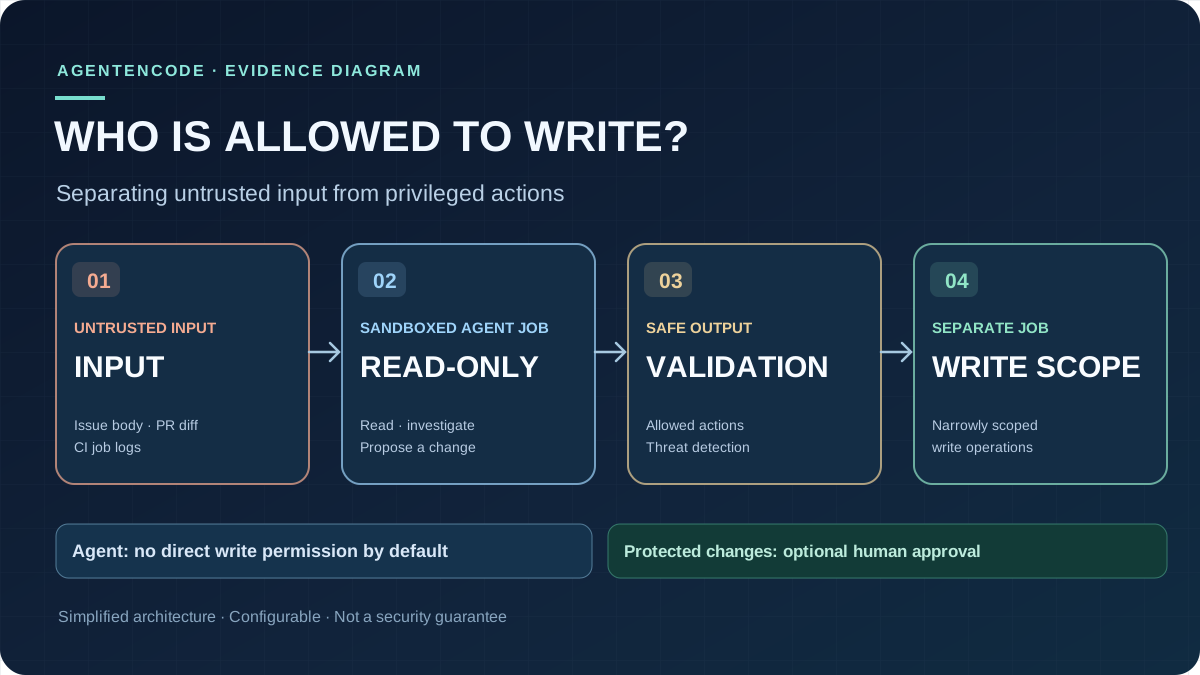
Read diagram as text
- Issue bodies, pull request diffs and CI logs may contain untrusted third-party instructions.
- The agent analyzes these materials in an isolated job that has read-only access by default.
- Safe outputs validate configured actions, supported by documented threat-detection controls.
- A separate job performs narrowly scoped writes. Sensitive changes should require human review.
Why an issue body may be an attack surface
A malicious prompt does not need to come from an authorized user. It may appear inside a repository issue, pull-request comment, source file or test log—precisely the material an agent is expected to read. The attacker attempts to have source content treated as an instruction: disclose a secret, alter a security file, call an unauthorized endpoint or fabricate evidence that a test passed.
GitHub's integrity filters and firewall are designed to limit this failure path, but a responsible pilot should test it. Submit a benign-looking issue containing a forbidden instruction. Inspect whether outbound requests are blocked. Verify that a suspicious code patch cannot bypass the threat-detection and review stages. Read-only execution means little if downstream privileged jobs blindly approve model-produced requests. Security evaluation must cover the entire chain from input to final write.
Licensing, model choice and budget forecasting
GitHub says the project is generally available on github.com for GitHub Free, Team and Enterprise. Using the default Copilot CLI engine requires a Copilot license. Operators can instead bring a supported coding agent. The GA release also describes model routing, ARC/Docker-in-Docker support, more isolated runtime choices, and updated workflow templates. Those capabilities may vary by runner, selected engine and organizational policy.
Operational costs depend on model calls, runner time, optional threat detection and retries. GitHub says gh aw forecast now estimates ranges that include threat-detection credits, but forecasts are not invoices or performance guarantees. Teams should track cost per accepted outcome, how many proposals are discarded and the human review time needed to make an automation genuinely useful.
The eye-catching productivity claims are a customer testimonial
In its launch post, GitHub quotes an Accenture manager reporting an estimated 29 hours saved per week for one lead, more than doubled team velocity, AI authoring 91% of commits, and a decline in a particular production-error count from roughly 11,000 per day to fewer than 1,000. Those figures come from an attributed customer account, not a controlled benchmark across organizations.
Without comparable baselines, measurement methods, a defined time frame and a control group, the numbers do not establish typical savings for other teams. AI-written commit share is also not a direct measure of code quality or business value. AgentenCode treats the figures as reported deployment experience, not independent validation of the product's effectiveness.
How this differs from one-off Copilot coding tasks
A conventional coding-agent task begins with a user request and ends in a specific proposed code change, often a pull request. Agentic Workflows instead formalizes a repeatable, version-controlled operational process that can react to repository events and schedules. It brings agent reasoning into the CI and issue-management system rather than making every action depend on another chat prompt.
This distinction matters for governance. A team can authorize an agent to analyze build failures while denying direct write access. If results need publication, they can pass through separate, logged approval steps. Our GitHub Copilot Coding Agent profile and AI-agent security guide provide wider context on delegated development and its boundaries.
A measured rollout for real teams
Start with a read-only reporting workflow that classifies failed CI jobs and links evidence without changing the repository. Next, let a narrowly scoped safe-output job create a draft issue or pull request that a reviewer must approve. Only after tests for prompt injection, duplicate triggers, permission escalation, unexpected network traffic and budget limits should anyone consider more autonomous writes.
Four metrics help avoid marketing-driven decisions: useful suggestions accepted, reviewer effort per proposal, cost per accepted result and the frequency of risky actions detected or blocked. The project's general availability is meaningful, but a successful installation is not evidence of a reliable automation across every codebase.
The real change is architectural
GitHub Agentic Workflows demonstrates how coding agents can move from isolated chats into repeatable software-delivery infrastructure. Markdown requests, compiled Actions and permission-separated outputs are tangible pieces of that shift. The competitive advantage will belong to teams that can audit and constrain the entire workflow—not merely generate more code with an agent.
Editorial status: October 31, 2026. This analysis is grounded in GitHub's published documentation and attributed customer claims. AgentenCode did not conduct an independent product benchmark or security audit.
Original sources and evidence limits
- GitHub Changelog: GitHub Agentic Workflows GA (28 October 2026)
- GitHub Agentic Workflows: Safe Outputs
- GitHub Agentic Workflows: Threat Detection
- GitHub Agentic Workflows: Security FAQ
- Official github/gh-aw release history
Editorial status October 31, 2026. First-party evidence is distinguished from simulations, testimonials and editorial assessment. No independent certification.
Frequently asked questions
Is GitHub Agentic Workflows free?
The open-source project is generally available on github.com for Free, Team and Enterprise. The default Copilot CLI engine requires a Copilot license; runner and model spending still depend on configuration.
Can the agent push code without approval?
The agent job is read-only by default. Configured safe outputs delegate writes to separate, more narrowly permitted jobs. Authors can change policies, so each workflow still needs review.
Are the published productivity figures independently verified?
No. The time-savings and quality figures appear in a named customer quote, not in a controlled benchmark that generalizes to other teams.