
LM Studio Bionic adds remote control for AI agents running on other machines
LM Studio Bionic now lets developers create and resume AI-agent sessions on another machine through end-to-end-encrypted LM Link. How permissions and remote execution work.
Bionic turns remote computers into agent workstations
On November 16, 2026, LM Studio introduced Agent Remote Control for its Bionic assistant. Users can create, inspect, continue and manage agent projects on a different machine they control. The remote host may be a laptop, desktop, development box or cloud virtual machine, while another device provides the user interface.
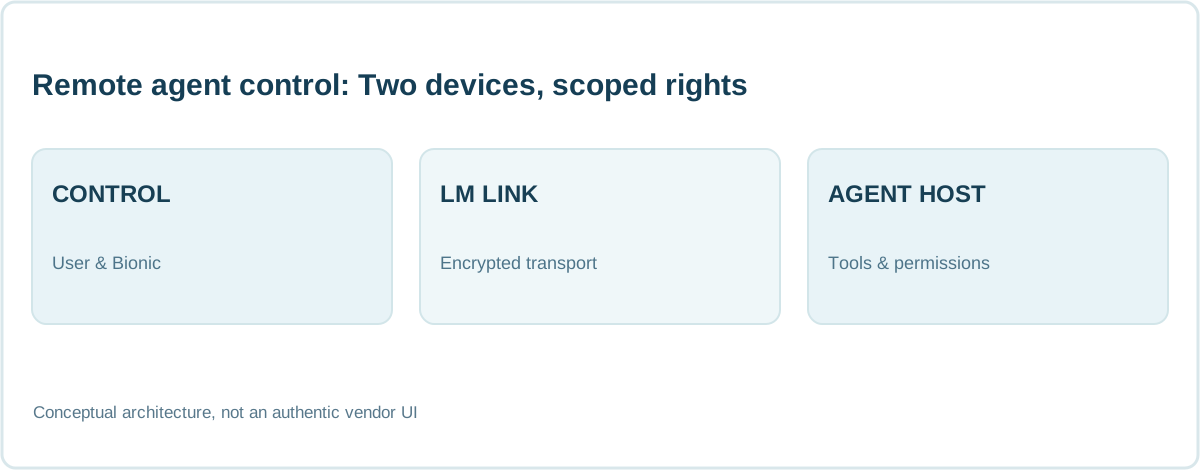
This is different from merely mirroring a remote desktop. Bionic organizes agent sessions and their project state on the remote host, allowing work to continue where the required operating system, tools and compute are available. Actual tool access remains governed by the environment and permissions on that host.
LM Link carries remote sessions over an encrypted connection
Remote control uses LM Link, the end-to-end-encrypted connection technology that LM Studio says was built in collaboration with Tailscale. The service previously made models running on one of a user's devices available to another; the new capability applies the same transport to Bionic's project and agent-session state.
Encryption protects information in transit but does not replace authorization. LM Studio emphasizes that each machine chooses whether to allow remote control of its agent sessions. The feature does not establish that arbitrary third-party computers can be accessed or that agents automatically obtain privileged rights on connected machines.
Setup requires explicit permission on the host
On the remote machine, the user installs Bionic and enables Remote control → Allow remote agent control. From a second device, the available hosts appear under Settings → Devices → Remote Machines. When creating a project, the user can choose which computer will execute the agent's tasks.
LM Studio also names llmster, its headless daemon, for machines without a graphical desktop. The important boundary is where execution really takes place: it uses the selected host's filesystem, tooling and allowed actions. Connecting from another screen is not an authorization shortcut.
Cross-platform work without rebuilding every environment
A developer using macOS may need to compile or test software on Windows or Linux. Remote control lets the agent execute against the correct target platform while the developer supervises from their usual computer. Builds, tests and commands happen on the machine with the necessary dependencies.
That can avoid duplicating complex environments, but it does not independently verify the resulting code. The agent still needs access to the intended repository, supported runtime and test fixtures, and the work should pass the same review and change-control process as code written locally.
Long-running sessions can remain on dedicated compute
LM Studio highlights long tasks such as performance optimization. An agent session can continue on a dedicated remote machine after the user closes their laptop, provided the host stays powered on and available. The controlling device can later reconnect and inspect the current session state.
A dedicated workstation may also reduce the impact of high-resource workloads on the user's primary machine. It is not automatically a security sandbox, however. Harmful scripts, configuration mistakes or incorrect agent commands can still affect the remote host unless constrained through appropriate accounts and isolation.
Device mentions allow directed delegation with @
Bionic also supports @-mentioning a machine in a session prompt. The user selects another connected device, and Bionic starts a separate session there. The remote interface indicates which initiating session delegated the work, making it easier to follow tasks across machines.
This is a useful pattern for dispatching platform-specific jobs. But the announcement does not prove a universal multi-agent orchestration layer with transactional guarantees, conflict resolution or automatic recovery. Teams should test how errors, disconnected hosts and concurrent edits are handled in their own projects.
Privacy and security: Local control is not always offline operation
LM Studio's wider ecosystem supports running open-weight models on hardware a developer controls. Remote Agent Control can involve other computers and cloud VMs, so the physical execution location is not necessarily the machine at the user's desk. Model inference may be local or use another configured provider, depending on the actual setup.
An end-to-end-encrypted device connection does not by itself guarantee offline execution, a particular data processing region or safety against prompt injection. Teams should inspect agent tool permissions, host credentials, network connections, session retention and whether confidential source code leaves the chosen environment.
AgentenCode assessment: Agents become distributed workflows
Agent Remote Control illustrates a shift from single-device assistants to workflows that can operate where appropriate compute and development tools are available. For individuals and small teams, the value could be simpler cross-platform testing and more practical long-running agent jobs.
The challenge remains safe execution and verification. Our computer-use and browser-agent reference and AI-agent security guide explain why permissions, isolation and genuine outcome checks matter. Moving an agent between machines increases flexibility, but only strong runtime boundaries make the extra reach dependable.
Frequently asked questions
What is Agent Remote Control in LM Studio Bionic?
A feature for creating, managing and resuming Bionic agent sessions on another user-controlled machine.
Is the connection encrypted?
LM Studio says remote sessions use end-to-end-encrypted LM Link, developed together with Tailscale.
Can an agent keep working when I close my laptop?
Yes, if the task runs on a separate host that remains on and accessible.
Does remote control guarantee all data stays local?
No. Execution and model inference locations depend on host, network and model configuration.
RESEARCH & CONTEXT
Sources for this article
This analysis relies on the original publications linked below, which readers can inspect directly.
- LM Studio — Introducing Agent Remote Control (16 Nov 2026)
- LM Studio — Introducing LM Studio Bionic: the agent for open models (27 Jul 2026)
- LM Studio — Blog and dated update history
Checked November 17, 2026. Vendor statements, pilot scope and preview benchmarks have not been independently reproduced or certified.