
AI agents no longer have to stop at writing suggestions. In a controlled environment they can navigate websites, prepare forms, test applications and execute multistep user-interface workflows. But computer use, browser use and direct API calls are different engineering options. This guide examines their mechanics, permission boundaries, reliability and cost without claiming that any one vendor's system works universally.
What does computer use mean for an AI agent?
Computer use is a form of tool use. A model receives an observation of an interface, chooses an action and emits a request to a separate application that controls the browser or desktop. That executor may click, type, scroll or press keys and then return the changed state. The model does not itself own an unrestricted operating-system session. It operates through a tool boundary.
This category can cover websites, native desktop programs and, where explicitly supported, mobile interfaces. It is an architecture rather than a promise about any particular product. Anthropic documents screenshot-based desktop controls, while OpenAI distinguishes computer and browser toolsets based on the environment and observation method.
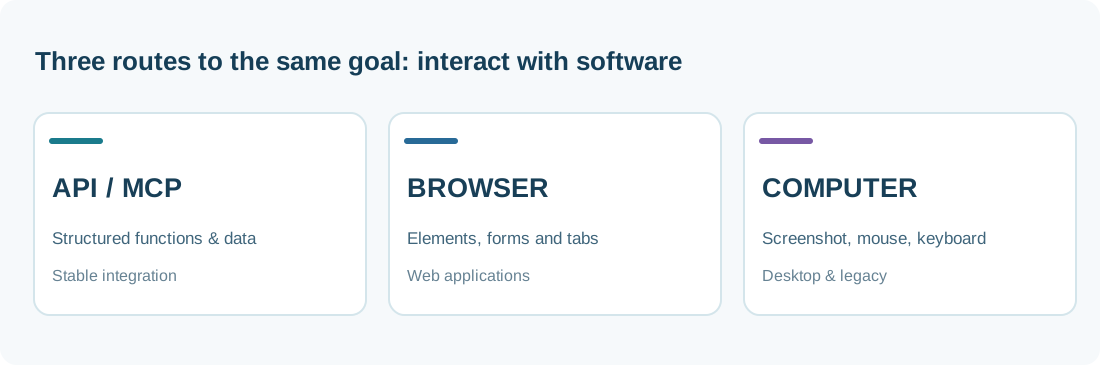
Computer use, browser use and APIs compared
A similar-looking task may be performed through coordinates, structured page references or an API endpoint. These paths differ in what the agent observes, how it acts and what can go wrong. Here, browser use describes a technical category rather than automatically referring to a product with the same name.
| Method | Observes | Acts with | Best fit | Typical risk |
|---|---|---|---|---|
| Computer use | Screenshots, UI state | Mouse, keyboard, scroll | Desktop and visual interfaces | Missed clicks, unstable coordinates, unintended actions |
| Browser use | DOM, accessibility tree, tabs, sometimes images | Element clicks, forms, navigation | Interactive websites | Dynamic layouts, untrusted content, account exposure |
| API / MCP tool | Structured data and tool schemas | Function and API calls | Stable system integrations | Excess scopes, wrong arguments, tool misuse |
The observation-action-feedback loop
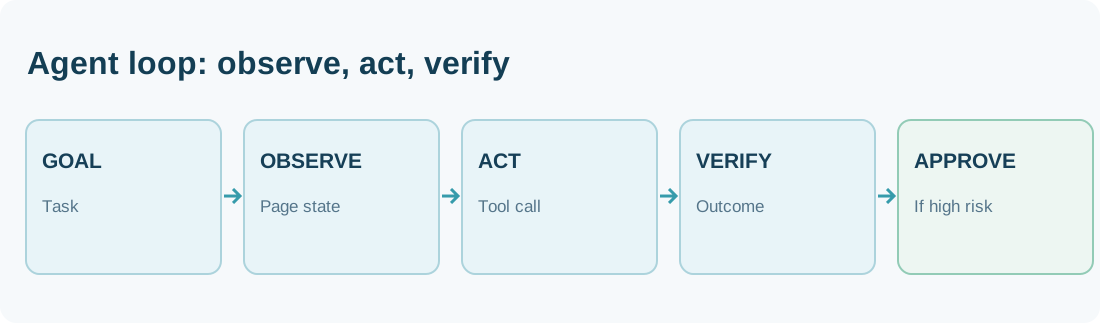
A typical run starts with a user instruction such as: “Open the test system, locate this record and prepare an update.” The agent receives a screenshot or current page structure, selects an action, and the client performs it. A fresh observation then determines whether the expected element appeared, a dialog blocked the workflow or the agent should stop.
Do not equate a requested click with a completed business operation. A click on Save might fail silently or affect the wrong account. The executor should return errors faithfully, and the workflow should verify the target record or an authoritative confirmation. OpenAI's integration recipes describe this observe-act loop and the need for a controlled driver.
Why browser agents can be more reliable than screen coordinates
A browser agent can identify a Submit button by its accessible role and name instead of guessing its position from a screenshot. Playwright MCP works with accessibility snapshots and referenced elements, and Anthropic's browser use tool reads page structure, forms and tabs. This can reduce ambiguity and support more deterministic interaction.
Structured access is not a cure-all. Canvas interfaces, poorly labeled components and unusual embedded viewers may need visual inspection. A sensible browser architecture prefers stable structured locators when available and switches to screenshots for cases that genuinely need visual understanding. The execution policy should remain the same across both paths.
Practical example: preparing a customer-support reply
Suppose a customer-service employee asks an agent to inspect an account issue and draft a response. The agent opens an authorized staging account, matches the case identifier, reviews relevant notes and populates a draft. It does not send the email. The employee confirms the recipient, content and attachments before the actual transmission takes place.
This example separates lower-risk reading and preparation from a consequential outgoing action. After explicit approval, the workflow must still confirm that delivery occurred as intended and did not create a duplicate action. It is an illustrative control design, not a benchmark or hands-on claim about a specific CRM agent.
Which workflows fit, and which require more caution?
Reasonable initial use cases include navigation within an internal test system, gathering non-sensitive information across tabs, filling unsent forms, exploring changes to a user interface and collecting public source material. Computer use can be useful when no suitable API exists, provided access rules and the site's terms permit automation.
Unattended first deployments are inappropriate for payments, identity and account-right changes, binding agreements, sensitive personnel data or activities with substantial physical or legal consequences. Consider a read-only workflow, isolated test environment or fully manual completion instead. Technical support for a click is not proof that the click is permitted.
Separate permission to access, act and approve
Authorization is layered. May the agent connect to the domain? Which account is it allowed to use? Can it read only, or also edit and export information? Which specific actions need a fresh approval? The user's request does not override a platform operator's access rules, as illustrated by United Airlines' policy for third-party booking agents.
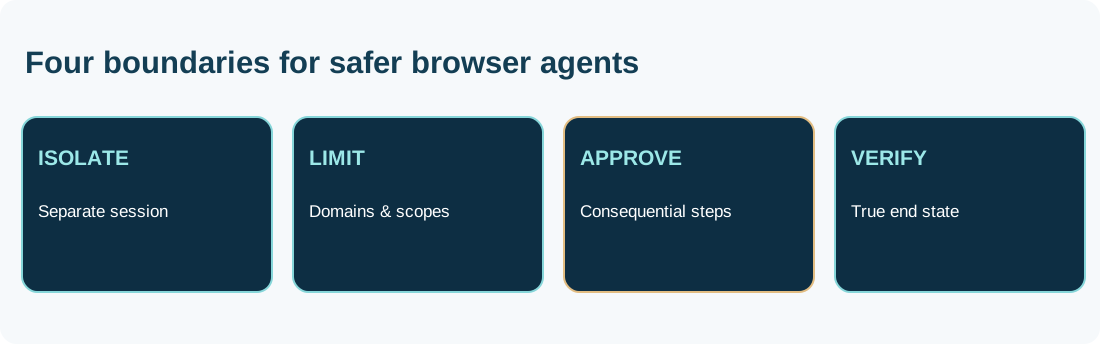
A sound architecture enforces boundaries in the runtime and tool implementations: domain allowlists, isolated sessions, narrow API scopes, step limits and approvals for consequential operations. Credentials should be managed by the host or delegated authorization flow, not casually placed in prompts. Access must be revocable and auditable.
Prompt injection: untrusted web content must stay data
An AI agent can encounter pages, emails, documents and images controlled by outsiders. A page might instruct it to ignore the user, reveal internal data or visit a malicious website. That content is part of the task environment; it is not a valid higher-priority user instruction. Computer use expands the consequences of such attacks because the agent may possess real action tools.
Anthropic explicitly warns that instructions embedded in webpages and screenshots can mislead models. Isolation, approved domains, least privilege, independently enforced policy checks and human confirmation for sensitive transfers help reduce the attack surface. A natural-language warning alone is not a complete security boundary.
Session isolation, cookies and data protection
A local browser session might expose existing cookies, stored passwords and private files. A hosted environment may avoid some local exposure, but changes where screenshots, browsing history and credentials are processed and stored. Neither hosted nor local execution should be assumed private, compliant or safe solely from its name.
Review separate sessions per user, file uploads, cookie retention, credential delegation, event logs, screenshots, deletion periods, data residency and access to recorded artifacts. Even a single screenshot can contain confidential customer information. Data minimization and cleanup are part of the agent's security design, not peripheral housekeeping.
Why visual automation can cost more than an API
A visually controlled agent may need repeated screenshots and model decisions after each action. Unexpected dialogs, page loading or layout changes add steps. Cost therefore includes model calls and image tokens, browser or virtual-machine minutes, storage of recordings and the work required to correct failures. A stable authorized API is often more efficient for predictable tasks.
Evaluate **cost per correctly completed task**, not merely cost per model request. Include first-attempt completion, human correction time, duplicate operations and unexpected side effects. Our agent cost and ROI guide and evaluations reference explain complementary measures.
Decision matrix: choose APIs, browser or desktop intentionally
Prefer an officially supported API with appropriately scoped permissions for recurring structured operations. If no suitable API exists and the workflow remains within webpages, structured browser automation is a reasonable next option. Full screenshot-driven desktop control is most justified for visual legacy programs or cross-app workflows that cannot be reached through narrower tools. Risk can still rule out any automated path.
| Situation | First candidate | Approval boundary |
|---|---|---|
| Official API with appropriate scopes | API / MCP tool | Token access, parameters, audit |
| Web application without a suitable API | DOM / accessibility browser control | Domain, session, read versus write |
| Visual-only legacy desktop program | Isolated computer use | VM, permitted windows, actions |
| Payment or binding transaction | Explicit human completion approval | Price, payee, scope, final evidence |
How to verify real-world reliability
A meaningful test suite includes unexpected conditions: slow loading, missing buttons, the wrong signed-in account, expired sessions, ambiguous data, surprise dialogs and deliberately withheld approval. The agent should end in an observable safe state: verified success, controlled cancellation or escalation to a person.
A click log is not enough. Verify the authoritative state of the target system, whether a task executed twice and whether unrelated records changed. Independent checks are especially important when the agent writes data. Our agent monitoring guide covers runtime metrics, drift and ongoing controls.
Current tool ecosystems and their real differences
OpenAI documents computer and browser toolsets with application-controlled drivers and a separate OpenAI-hosted browser path through the Agents API. Anthropic documents desktop and browser client toolsets, Google has its own computer-use API features, and Playwright provides browser automation through accessibility snapshots. They are not interchangeable products: execution ownership, supported models, permissions and deployment vary.
Related AgentenCode reports include Gemini computer-use availability, OpenAI Agents API computer use and Expo Simulators for coding agents. Those articles cover dated product events; this permanent reference provides the architecture and evaluation framework.
Ten questions before a production computer-use pilot
A responsible team should document ten answers before allowing a real agent to change records: (1) What exactly is the task? (2) Which sites and windows are allowed? (3) Which data are sensitive? (4) Where does the session run? (5) Which identities and credentials are used? (6) Which actions are read-only? (7) Where must a person approve? (8) What happens on failure? (9) How is the actual outcome verified? (10) When are sessions and artifacts deleted?
Answers must be reflected in enforceable runtime policy rather than simply pasted into the model's system prompt. A sensible pilot uses disposable credentials and known test cases, includes negative and cancellation tests, and moves to riskier actions only after failures have been understood.
AgentenCode assessment: computer use is an integration strategy, not a quality badge
Computer use is compelling because it makes some software accessible without a purpose-built API. It can extend agents into the everyday interfaces that organizations actually use. But wider reach also means more opportunities for errors, especially on dynamically changing websites and in authenticated environments.
Our default design preference is **authorized API first, structured browser automation second and unrestricted visual desktop control only where justified**. Some tasks require a more visual route, but they also need tighter isolation and oversight. This guide interprets documented technical approaches; AgentenCode has not conducted independent head-to-head product testing.
Frequently asked questions
What is computer use for AI agents?
A model observes a graphical interface and requests mouse or keyboard operations through a controlled runtime; the model does not directly operate the OS.
How does browser use differ from computer use?
Browser use stays within webpages and often uses element structure and tabs, while computer use can control a full desktop through screenshots and input devices.
Is browser use the same as web scraping?
No. Browser agents can interact with pages and change state; data extraction is only one possible task.
Are APIs safer than clicks?
Well-designed APIs can provide clearer controls, but wide scopes or incorrect arguments can still cause serious mistakes.
Does every action require a human?
No, but meaningful financial, legal and sensitive operations should have explicit authorization and independent verification.
Can browser agents log in to any website?
No. They require supported session or login mechanisms and must respect the destination service's access rules.
How can an agent prove it completed a task?
By verifying the authoritative end state, not merely reporting a click or returning a fluent status message.
What sensitive data may appear in screenshots?
Names, account data, credentials, documents and internal information may be visible, so retention and access controls matter.
What does computer use cost?
Cost depends on model and screenshot calls, environment runtime, artifacts, retries and human corrections.
Did AgentenCode independently test the systems mentioned?
No. This guide is a source-based technical assessment with clearly labeled examples and inference.
Primary documentation and scope
Reviewed November 16, 2026. Capabilities and availability depend on implementation; no independent AgentenCode product benchmarks were conducted.
- OpenAI – Computer use: browser and desktop tools, SDK drivers and human authorization
- OpenAI – Agents API computer use in OpenAI-hosted browsers
- Anthropic – Computer use tool (desktop screenshots, mouse and keyboard)
- Anthropic – Browser use tool (page elements, tabs and accessibility)
- Google AI for Developers – Gemini computer use documentation
- Microsoft Playwright – MCP browser automation and accessibility snapshots
- Microsoft Playwright – Browser automation and test isolation
- Model Context Protocol – MCP specification (tool interface and authorization context)